Rental operations platform — back office plus field app
2026
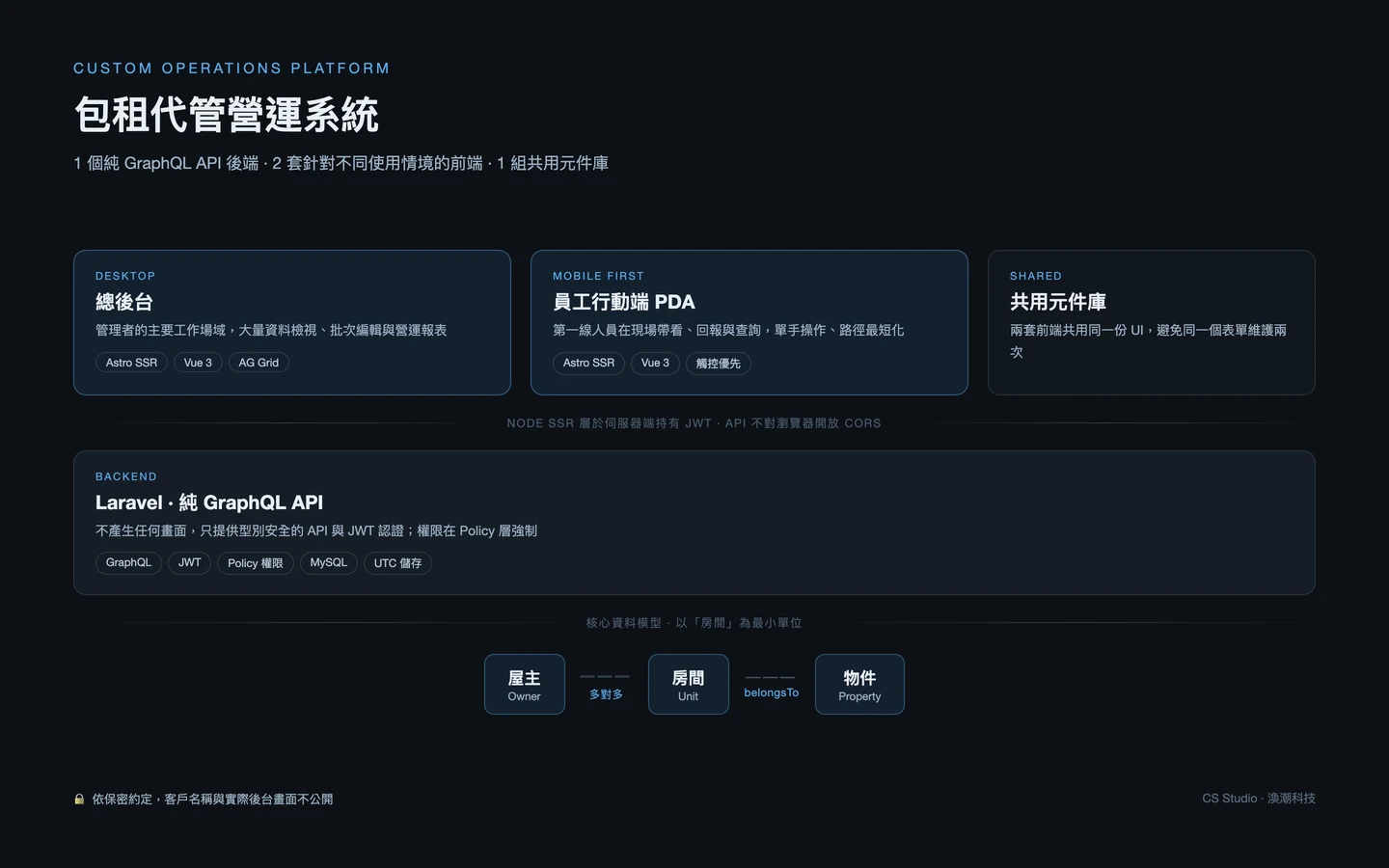
This is an internal operations platform for a property leasing management business. The model works like this: the operator leases units from owners and sublets them to tenants, handling viewings, contracts, rent collection, maintenance and move-outs in between — work that usually lives scattered across spreadsheets, messaging apps and paper.
The design hinges on a three-tier data model centred on the unit. An owner can hold many units, and each unit belongs to a property such as a building or a complex. In practice one owner may hold a handful of units spread across different properties, while a single property can contain units belonging to different owners — so owner and unit form a many-to-many relationship rather than the simple hierarchy people usually reach for. Get this wrong and every downstream process has to work around it.
The interface is deliberately split in two. A desktop back office gives managers dense data maintenance and reporting; a mobile-first field app lets front-line staff run viewings and file reports on site. Both share one component library and one GraphQL API, but the working contexts are so different that forcing them into a single responsive layout would serve neither well.
A unit-centred structure with a many-to-many owner relationship, correctly reflecting buildings with multiple owners and owners holding units across multiple buildings
The manager's primary workspace, built around data grids with dense column views, bulk editing and filtering for daily maintenance and reporting
A separate mobile-first front end for staff running viewings and filing reports on site, with flows designed for one-handed use on mobile networks
Both front ends draw on one UI kit, keeping look and behaviour consistent and avoiding two copies of every form component
The backend renders no screens at all — just a typed GraphQL API behind JWT auth, so each front end fetches exactly the fields it needs without bespoke endpoints per screen
Timestamps are stored in UTC and rendered in the viewer's zone, while operational cut-offs such as overdue rent are always judged in the operating region's zone
Owners, properties, units, contracts and staff each carry a structured reference format, giving paper workflows and phone conversations a shared language with the system
Managers, sales and field staff see different data and can take different actions, enforced in backend policies rather than by hiding buttons in the UI
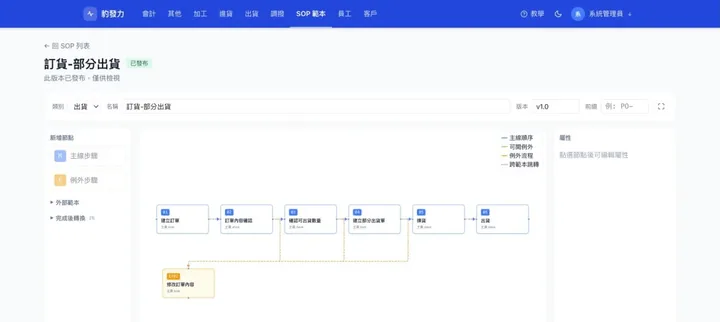
A single booking travels from first enquiry to key handover across four roles and two separate interfaces. The diagram marks who performs each step and which ones the system handles alone — it served as the build specification and, after handover, as training material.
The main path is driven by the field agent, with every step reflected immediately in unit and contract state; the back office handles verification and exceptions.
Unit and contract states are always derived from timestamps rather than stored in a status column, so data cannot drift out of step with reality.
Holds and overdue move-ins are swept by scheduled jobs, but the rules never depend on the scheduler — the correct state is computed either way.
Cancelling writes a timestamp. The record stays, marked cancelled, and the related resources are released back automatically.
The back office exists to review many records at once and edit in bulk, which wants wide screens and dense tables. The field app exists to deal with the one unit in front of you, which wants large targets and the shortest possible path. Those two demands on information density point in opposite directions, and a single responsive layout usually ends up sparse on desktop and cramped on mobile. Splitting the front ends while sharing one API and one component library lets each optimise for its own context without doubling the maintenance.
The classic mistake in this domain is treating the building as the smallest unit. In reality contracts, rent, maintenance and tenants all attach to an individual unit. And because a single property routinely contains units held by different owners, the owner relationship has to be many-to-many. Fixing the granularity at the unit and modelling ownership as many-to-many is what keeps the later billing flows free of "whose money is this" ambiguity.
The backend is a pure GraphQL API that renders nothing. Both front ends are server-rendered, so the browser only ever talks to its own Node SSR layer, which holds the JWT and calls the API server-side. That means the API needs no CORS exposure to browsers at all and no token ever reaches the client — a considerably smaller attack surface than a conventional decoupled setup.
The back office lives or dies on reviewing and editing large record sets, so it uses a dedicated grid component for column pinning, sorting, filtering, virtual scrolling and inline editing. Hand-rolling this on a plain table works until the data grows, then stalls; a purpose-built grid keeps thousands of rows scrolling and filtering smoothly.
Time is where cross-border systems break first. The rule here separates three concerns: the database always stores UTC so daylight saving and conversion never contaminate the source data; the interface renders in the viewer's own zone; and operational judgements — billing periods, overdue status, daily report boundaries — always use the operating region's zone, because that is the only basis that means anything commercially. Keeping the three apart means it no longer matters where someone logs in from.
A system like this never replaces paper overnight; through the transition there will be phone calls and signed forms. So owners, properties, units, contracts and staff each got a structured reference format that a person can read aloud and write down. It sounds mundane next to the architecture, but it is what lets the system and the existing field workflow coexist.
This is an internal business system rather than a public website, so there is no URL an outside visitor could open in the first place. On top of that we have a confidentiality agreement with the client covering both their name and the actual admin screens. What this page focuses on instead is the architecture, the data model and the technical decisions — the parts that actually demonstrate how we handle work of this kind. If you are evaluating something similar we are glad to go through the implementation in a call.
Because everything involving money or responsibility happens at unit level. A contract is signed on one unit, rent is collected per unit, maintenance is carried out on one unit, and a tenant occupies one unit. Treat a whole building as the smallest entity and the accounts become impossible the moment five units in it are let separately to different owners. That situation is common in practice, which is also why ownership has to be many-to-many rather than hanging owners off the property. Get this model wrong at the start and every subsequent workflow needs a workaround.
It looks cheaper and ends up worse at both ends. The back office is used sitting at a desk working through dozens of records at a time, which needs dense grids and bulk actions. The field app is used standing in a property filing one report on a phone, which needs large targets and the shortest possible path. Those requirements pull in opposite directions, and a single responsive layout typically comes out sparse on desktop and cramped on mobile. Splitting them while sharing one GraphQL API and one component library gets each context properly optimised without doubling the maintenance burden.
As soon as operations span time zones, time becomes the most common source of bugs. We separate it into three layers. The database always stores UTC, so daylight saving and conversion never corrupt the source data. The interface converts to the viewer's own zone, so everyone reads times they recognise. And operational judgements — whether rent is overdue, what counts as today's reporting window — always use the operating region's zone, because that is the only commercially meaningful basis. With the three kept apart, where someone logs in from no longer affects the books.
CONTACT US
Leasing management, rental operations, job dispatch, or any multi-role operational system — we start from the data model and build it to fit.
Get in touch